



















How to reset or initialize the Wireless Headphones (WH-1000XX THE COLLEXION)
IMPORTANT: This article applies only to specific products and/or operating systems. Check the Applicable Products and Categories section of this article before starting these steps.
Reset the headset
-
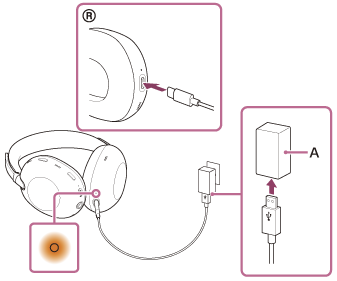
Connect the headset to an AC outlet.
Use a USB Type-C cable and USB AC adaptor (A).
-
Press and hold the power button (B) and the noise canceling/Ambient Sound Mode button (C) for about 5 seconds.
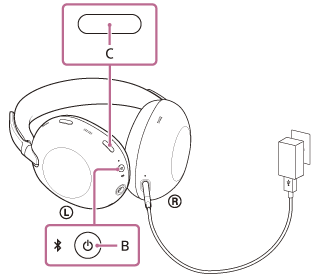
The headset will be reset (the charging indicator turns off and then lights up again).
NOTES:
- During a reset, the device registration (pairing) information and other settings are retained.
- If the headset does not operate correctly even after a reset, initialize the headset to restore the factory settings.
Initialize the headset to restore factory settings
IMPORTANT: This operation resets all the device settings to the factory defaults and deletes all pairing information.
NOTE: After initializing the headset, you should also delete the headset pairing information from any connected devices and then pair them again.
-
Turn off the headset.
Remove the USB Type-C cable.
-
Press and hold the power button (A) and the noise canceling/Ambient Sound Mode button (B) for about 10 seconds.
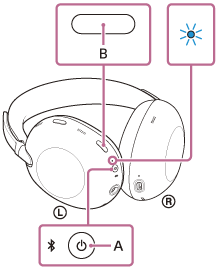
When initializing is complete, the indicator flashes in blue 4 times.
-
Delete the headset from the list of Bluetooth products on your device.
-
Pair the headset to your selected device again
NOTES:
- If you have updated the software after purchasing the headset, the software is retained updated even if you initialize the headset.
Repair & Warranty
Book, track or maybe even avoid a repair
Contact support
Contact our Support team
Support by Sony (Mobile App)
Never miss an update again! Find information and receive instant notifications about your product

