The seven-digit serial number can usually be found on the original packaging of your product.

Alternatively, you can also find the model name and serial number on the product or on the case. Below are some examples of where you can find the model and serial number for different types of headphones.
Check out the video below to learn how to find my Headphones model name and serial number.
![]()
Tip: Learn how to turn captions on or off when watching Internet videos from YouTube
You can usually find the model name and seven-digit serial number either on the headband or inside the head-padding, as shown in the image below
Notes:
- Some of our products have model names that start with "YY" followed by 4 digits. These models have dual model names.
- To easily find support information or register your product, please use the model name that begins with "WH".
- If you are unable to find model name that begin with "WH", refer to Model name and code information to find out the the alternative model name that begin with "WH"
Example: WH-1000XM6 (model code: YY2984)
- Make sure the headset is turned off and the USB cable is not connected.
- Remove the earpad from the right unit by pulling it straight off the housing. Avoid pulling it off at an angle.
The serial number and safety marks, etc., are located on the lower right corner of the right unit.

- Attach the removed earpad to the right unit.
- Make sure to firmly insert the five tabs into the unit until you hear a click.
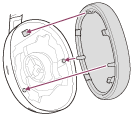
- Do not remove the earpad unless necessary.
- Before removing the earpad, make sure the headset is turned off and the USB cable is not connected.
- Do not remove the earpad in the presence of iron sand or other metal objects. Iron sand or other metal objects may adhere to the magnet inside the headset, causing the headset to malfunction.
- Any defects caused by failure to follow the above precautions are not covered by the product warranty.
Example: WH-1000XM5 (model code: YY2954)


The model name and seven-digit serial number are located either on the bottom or within or behind the charging case, as illustrated below.
Notes:
- Some of our products have model names that start with "YY" followed by 4 digits. These models have dual model names.
- To easily find support information or register your product, please use the model name that begins with "WF".
- If you are unable to find model name that begin with "WF", refer to Model name and code information to find out the the alternative model name that begin with "WF"

Example for WF-1000XM4

Example for WF-1000XM3

Example for WF-1000X

Example for WF-L900 (Linkbuds)
You can usually find the model name and seven-digit serial number on the headband slider of left channel, as shown in the image below
Notes:
- Some of our products have model names that start with "YY" followed by 4 digits. These models have dual model names.
- To easily find support information or register your product, please use the model name that begins with "WF" or 'WH".
- If you are unable to find model name that begin with "WF"or "WH", refer to Model name and code information to find out the the alternative model name that begin with ""WF" or "WH"

You can usually find the model name and seven-digit serial number on the neckband, as shown in the image below

You can usually find the model name and seven-digit serial number on the inside of the right channel, as shown in the image below

Example for WI-C100
Notes:
- Some of our products have model names that start with "YY" followed by 4 digits. These models have dual model names.
- To easily find support information or register your product, please use the model name that begins with "WI".
- If you are unable to find model name that begin with "WI", refer to Model name and code information to find out the the alternative model name that begin with "WI"
Note: Some headphones don't have a serial number on them.





















