



















Head Gesture Function on Sony Headphones
Head Gesture function is only supported on certain Sony Headphones models below:
- WF-1000XM6
- WF-1000XM5
- LinkBuds Open WF-L910
- LinkBuds Fit WF-LS910N
- WH-1000XM6
Head Gesture function allows you to control your headphones simply by nodding or shaking your head during incoming calls or when using Auto Play.
Perform the gestures facing forward so that your nodding and the shaking of your head can be detected easily.
- Receive a call: Nod your head.
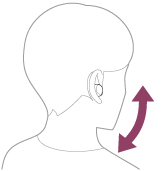
- Reject a call: Shake your head.
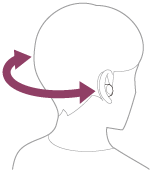
To enable or disable Head Gesture, open the Sony | Sound Connect app connected to your headphones, select Device settings under My Device, go under System and look for Head Gesture.
Note:
- If you are using only one headset unit, the functions may not work properly.
- The functions may not work properly with the head gesture controls depending on the connected device or the application you are using.
- Auto Play is not available in certain countries and regions.
You may also find out more about Sony | Sound Connect app by visiting Benefits for using Sony | Sound Connect app
Repair & Warranty
Book, track or maybe even avoid a repair
Contact support
Contact our Support team
Support by Sony (Mobile App)
Never miss an update again! Find information and receive instant notifications about your product

